WAC Solution Partners

Expertise With Local Roots & National Reach

(877) 909.2224
  • Locations
    • Cincinnati
    • Los Angeles
    • Midwest
    • New England
    • Palm Desert
    • San Diego
    • Southeast
    • Utah
  • Products
    • Sage
      • SAGE 50
      • Sage 100
      • Sage 300
      • Sage X3
      • CRM
      • Sage Pro (SBT)
    • Acumatica
    • MIP
    • Alere
    • Solution Extensions
  • Information
    • Blog
    • Newsline
    • Product Versions
    • Awards
    • Partner Directory
    • Employment
    • Contact

How do I adjust an Accounts Receivable Invoice in Sage 100

Common question: In Sage 100 ERP (formally Sage MAS90) Accounts Receivable how do I do an adjusting Invoice entry and when is it necessary?
Answer: An Accounts Receivable invoice adjustment may be necessary because an incorrect entry was made. Sometimes it is done when a customer requests a write-down of an invoice, but this can also be handled with a credit memo. Note when an invoice adjustment is made there is no invoice printed, so if you need something printed to give to the customer we suggest using a Credit Memo.
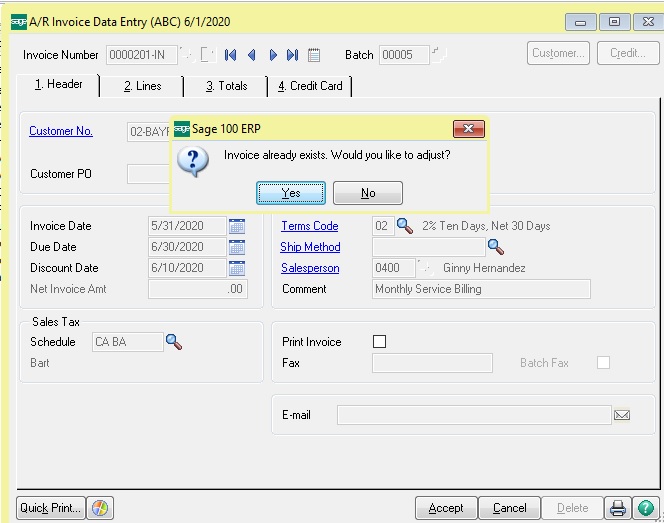
First, go to Sage 100 ERP Accounts Receivable>Main>Invoice Data Entry, type in the invoice number and customer number. After this you will see a message, Invoice already exists do you want to adjust, click the yes button.
1bog
Second, the system then pulls the existing invoice information and shows it on the screen, at the first screen verify the information is correct and then click the OK button.
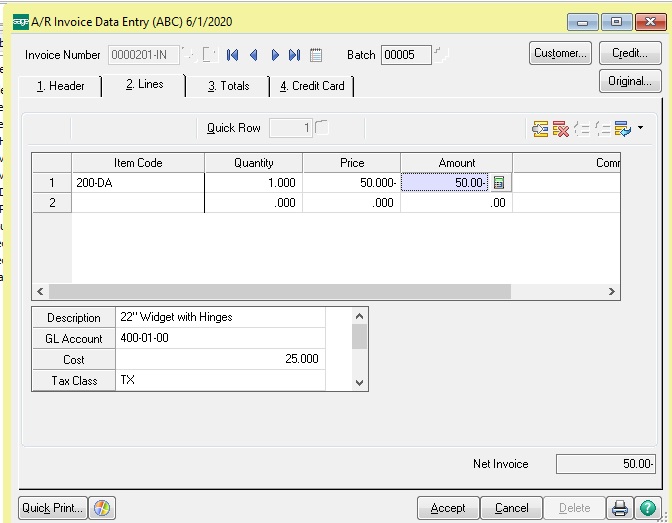
Third, the system will then pull the original invoice entry screen with the original date, click on tab #2 lines and type in the adjustment amount and use the correct item codes, you will want to make the amount negative. In our example we wanted a $50 adjustment. Accept the entry, run the Accounts Receivable sales journal and post as always.
2blog
You should now be able to check in Accounts Receivable Customer Invoices and see the reduced amount of the invoice in question.

If you have questions please contact us at www.caserv.com or 760-618-1395. Please stay tuned for more helpful Sage 100 ERP tips!

Tags: Sage 100 ERP, MAS 90, MAS 200, Sage 100 Accounts Receivable, Accounting System, ERP Solution, Accounting Software


Share this...
Share on facebook
Facebook
Share on pinterest
Pinterest
Share on twitter
Twitter
Share on linkedin
Linkedin

Search Blog

Subscribe to Blog

Categories

  • Abila
  • Acumatica
  • Business Environment
  • Client Stories
  • Cloud ERP
  • CRM
  • ERP Training
  • General
  • HRMS
  • Leadership
  • Michael Ericksen
  • Mike Renner
  • Netsuite
  • News and announcements
  • Paya
  • Pivot Tables
  • Sage 100
  • Sage 300
  • Sage CRM
  • Sage Payment Solutions
  • Sage Summit
  • Sales Tax
  • Software
  • Son Of Omega Tour
  • Tax Changes
  • Tips and Tricks
  • Uncategorized
  • Upcoming Events
Generic selectors
Exact matches only
Search in title
Search in content
Post Type Selectors
Copyright © 2026 ,  WAC Solution Partners. All Rights Reserved.  |  Privacy Policy  
We use cookies on our website to give you the most relevant experience by remembering your preferences and repeat visits. By clicking “Accept”, you consent to the use of ALL the cookies.
ACCEPTREJECT
Privacy & Cookies Policy

Privacy Overview

This website uses cookies to improve your experience while you navigate through the website. Out of these, the cookies that are categorized as necessary are stored on your browser as they are essential for the working of basic functionalities of the website. We also use third-party cookies that help us analyze and understand how you use this website. These cookies will be stored in your browser only with your consent. You also have the option to opt-out of these cookies. But opting out of some of these cookies may affect your browsing experience.
Necessary
Always Enabled
Necessary cookies are absolutely essential for the website to function properly. This category only includes cookies that ensures basic functionalities and security features of the website. These cookies do not store any personal information.
Non-necessary
Any cookies that may not be particularly necessary for the website to function and is used specifically to collect user personal data via analytics, ads, other embedded contents are termed as non-necessary cookies. It is mandatory to procure user consent prior to running these cookies on your website.
SAVE & ACCEPT