WAC Solution Partners

Expertise With Local Roots & National Reach

(877) 909.2224
  • Locations
    • Cincinnati
    • Los Angeles
    • Midwest
    • New England
    • Palm Desert
    • San Diego
    • Southeast
    • Utah
  • Products
    • Sage
      • SAGE 50
      • Sage 100
      • Sage 300
      • Sage X3
      • CRM
      • Sage Pro (SBT)
    • Acumatica
    • MIP
    • Alere
    • Solution Extensions
  • Information
    • Blog
    • Newsline
    • Product Versions
    • Awards
    • Partner Directory
    • Employment
    • Contact

Sage 100 Consultant Tip: Paperless Office Won't Print

Sage 100 ERP consultant, we had a client who had a technical issue with Paperless Office hanging up. Do you know how to stop this from happening?
NOTE: Consult with your certified Sage 100 ERP consultant before making any changes to your Sage 100 ERP system.
Question: We are a Sage 100 user, we are using the Paperless Office and the printer hangs up forever.
Answer: Here’s what to do when Paperless Office hangs up…

  • Sage 100 ERP Indio ConsultantReviews 6 Steps to Stop Paperless Office Hangups

1)  Check permissions on Sage PDF Converter:
Run, Regedit
Sage 100 ERP consultant paperless office
Click on: HKEY_CURRENT_CONFIG, Software, Sage PDF Converter, right click select permissions and set full rights to everyone. Apply and OK.
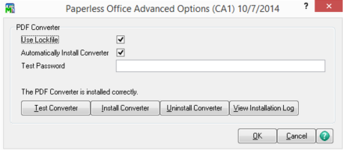
2)  In Sage 100, File Run PL_AdvancedOptions_UI
Sage 100 ERP consultant paperless office 2
3)  Uninstall Converter, then Install Converter.
4)  De-install Workstation Setup and then Re-Installed Workstation and run Update.
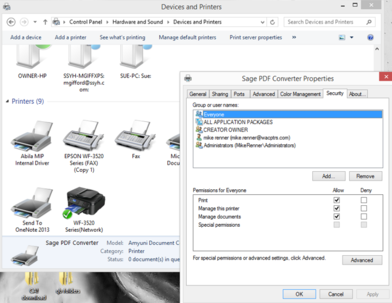
5)  Find Sage PDF Converter from printer properties, install Sage port if not there, on the security tab set full permissions to everyone. Apply and OK.
Sage 100 ERP consultant paperless office 3
6)  Back to Sage 100, File Run PL_AdvancedOptions_UI and test Sage PDF printer.
This should solve the problem in most cases, Paperless Office printing is done on a machine by machine basis so it is necessary to check these steps on each machine.
If you have questions please contact us at www.caserv.com, email or 760-618-1395. Please stay tuned for more helpful Sage 100 ERP tips!

Share this...
Share on facebook
Facebook
Share on pinterest
Pinterest
Share on twitter
Twitter
Share on linkedin
Linkedin

Leave a Reply Cancel reply

Your email address will not be published. Required fields are marked *


The reCAPTCHA verification period has expired. Please reload the page.

Search Blog

Subscribe to Blog

Categories

  • Abila
  • Acumatica
  • Business Environment
  • Client Stories
  • Cloud ERP
  • CRM
  • ERP Training
  • General
  • HRMS
  • Leadership
  • Michael Ericksen
  • Mike Renner
  • Netsuite
  • News and announcements
  • Paya
  • Pivot Tables
  • Sage 100
  • Sage 300
  • Sage CRM
  • Sage Payment Solutions
  • Sage Summit
  • Sales Tax
  • Software
  • Son Of Omega Tour
  • Tax Changes
  • Tips and Tricks
  • Uncategorized
  • Upcoming Events
Generic selectors
Exact matches only
Search in title
Search in content
Post Type Selectors
Copyright © 2026 ,  WAC Solution Partners. All Rights Reserved.  |  Privacy Policy  
We use cookies on our website to give you the most relevant experience by remembering your preferences and repeat visits. By clicking “Accept”, you consent to the use of ALL the cookies.
ACCEPTREJECT
Privacy & Cookies Policy

Privacy Overview

This website uses cookies to improve your experience while you navigate through the website. Out of these, the cookies that are categorized as necessary are stored on your browser as they are essential for the working of basic functionalities of the website. We also use third-party cookies that help us analyze and understand how you use this website. These cookies will be stored in your browser only with your consent. You also have the option to opt-out of these cookies. But opting out of some of these cookies may affect your browsing experience.
Necessary
Always Enabled
Necessary cookies are absolutely essential for the website to function properly. This category only includes cookies that ensures basic functionalities and security features of the website. These cookies do not store any personal information.
Non-necessary
Any cookies that may not be particularly necessary for the website to function and is used specifically to collect user personal data via analytics, ads, other embedded contents are termed as non-necessary cookies. It is mandatory to procure user consent prior to running these cookies on your website.
SAVE & ACCEPT